Optimizing Paid Campaign Budgets Across Channels

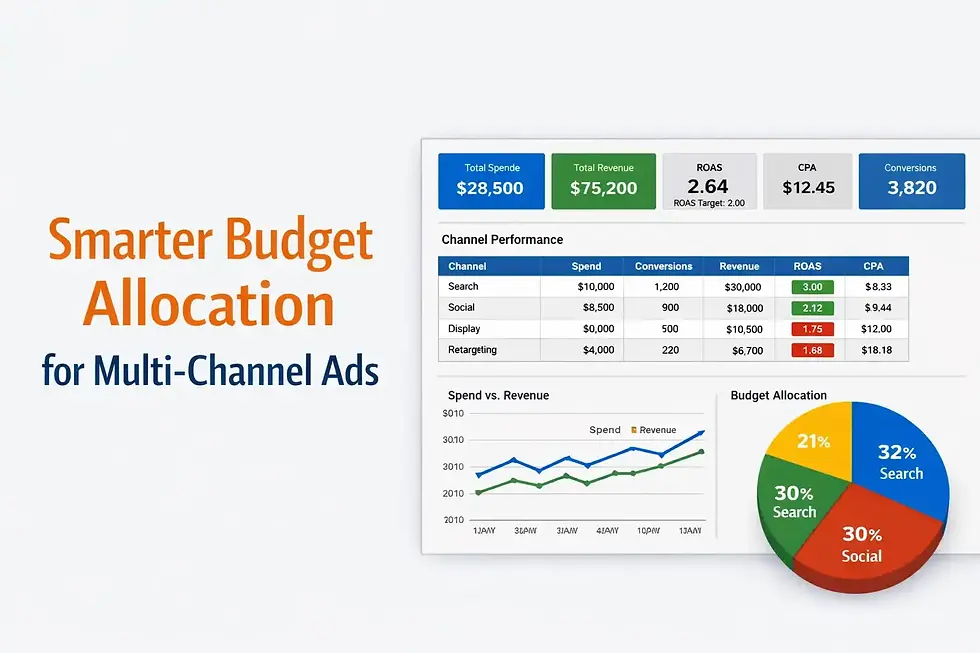
Paid media rarely fails because teams spend too much—it fails because they spend blindly. Budgets get locked into channels based on habit, gut feel, or last quarter’s performance rather than real-time results. As brands expand beyond a single platform, the challenge shifts from launching campaigns to allocating budget intelligently across channels.
This guide breaks down how to optimize paid campaign budgets across multiple platforms using performance data, unified dashboards, and practical decision rules—without enterprise-level tooling or data science teams.
Key Takeaway
Optimizing paid campaign budgets across channels requires centralized performance visibility, consistent KPIs, and data-driven reallocation rules. When all channels are measured in a single Looker Studio dashboard, marketers can quickly identify which platforms drive profitable growth—and shift spend accordingly without guesswork.
Why Multi-Channel Budget Optimization Is So Difficult
Most SMBs advertise across at least three platforms—search, social, and retargeting—yet analyze each one in isolation. That creates several problems:
Inconsistent attribution models
Different conversion definitions
Separate reporting interfaces
No shared performance baseline
Without a unified view, marketers often increase spend on the loudest channel rather than the most efficient one.
Step 1: Normalize KPIs Across All Channels
Before optimizing budgets, all platforms must be evaluated using the same core metrics. Channel-specific vanity metrics distort decision-making.
Foundational KPIs to standardize:
Spend
Conversions
Revenue (or pipeline value)
ROAS or CPA
Conversion rate
Once these KPIs are normalized, performance becomes directly comparable—even between very different channels like paid search and paid social.
Step 2: Build a Multi-Channel Performance Dashboard
Optimization only works when performance is visible in one place. A multi-channel dashboard acts as the control center for budget decisions.
A well-designed dashboard should include:
Total spend by channel
Conversions and revenue by channel
ROAS or CPA comparison table
Trend lines for spend vs. return
Date controls for rapid analysis
This allows teams to see not just who spent the most, but who delivered the most value.
Step 3: Identify Marginal Returns by Channel
Not all spend is created equal. A channel with strong ROAS at low spend may collapse when scaled, while another may improve with volume.
Key questions to answer:
Does ROAS improve or decline as spend increases?
Where does CPA spike?
Which channel absorbs incremental budget most efficiently?
This is where rolling averages and time-based comparisons inside Looker Studio provide clarity without over-engineering.
Step 4: Create Budget Allocation Rules
Optimization requires rules—not reactions.
Common allocation strategies include:
ROAS-weighted distribution: Allocate incremental budget to channels above target ROAS
CPA ceiling model: Pause or reduce spend once CPA exceeds a threshold
Blended efficiency model: Balance high-ROAS channels with high-volume channels
These rules turn dashboards into decision engines, not just reporting tools.
Step 5: Visualize Budget Allocation Clearly
Budget optimization decisions should be instantly understandable—especially when shared with leadership or clients.
Effective visuals include:
Spend distribution by channel
Revenue contribution by channel
ROAS-weighted allocation charts
Before-and-after budget shifts
Clear visuals reduce friction, speed approvals, and prevent emotional budget debates.
Step 6: Monitor Performance After Reallocation
Optimization doesn’t end when budgets shift. Every reallocation should be followed by close monitoring to confirm assumptions.
Best practices:
Review performance weekly
Track ROAS and CPA trends post-change
Watch for lagging conversion windows
Flag volatility early
Looker Studio’s automated refresh ensures decision-makers always see current data without manual updates.
Common Budget Optimization Mistakes to Avoid
Chasing short-term spikes without trend validation
Optimizing solely for ROAS while ignoring scale
Failing to normalize attribution across channels
Making changes without post-adjustment monitoring
Avoiding these mistakes preserves momentum and prevents unnecessary resets.
Why Looker Studio Works for Multi-Channel Optimization
For SMBs, Looker Studio offers a rare combination of power and accessibility:
Free core platform
Native integrations with major ad channels
Flexible calculated fields for ROAS and CPA
Shareable, client-ready dashboards
Most importantly, it allows teams to optimize spend visually, not just numerically.
FAQ
How often should I reallocate paid campaign budgets?
Most teams benefit from weekly or bi-weekly reviews, depending on volume and conversion lag.
Can I optimize budgets without revenue data?
Yes, but revenue unlocks far better decisions. When unavailable, CPA and conversion quality proxies help.
Is ROAS always the best optimization metric?
Not always. Lead-gen, awareness, and pipeline campaigns often require blended or CPA-based models.
Do I need attribution modeling to optimize budgets?
Attribution helps, but consistent KPIs and trend analysis deliver strong results even without complex models.
Final Thoughts
Optimizing paid campaign budgets across channels is less about perfection and more about visibility and discipline. When performance lives in a single dashboard and decisions follow clear rules, marketers gain control over spend instead of reacting to noise.
For SMBs especially, the combination of Looker Studio dashboards, standardized KPIs, and simple allocation logic creates a scalable system—one that grows smarter with every campaign cycle.
